- sales/support
Google Chat: zj734465502@gmail.com
- sales
+86-0755-88291180
- sales01
sales@spotpear.com
- sales02
dragon_manager@163.com
- support
tech-support@spotpear.com
- CEO-Complaints
zhoujie@spotpear.com
- sales/support
WhatsApp:13246739196
- HOME
- >
- ARTICLES
- >
- Milk-V
- >
- Milk-V Duo
Milk-V Duo Tutorial【Enable virtual RAM memory】
Virtual memory is a technology in the operating system that is used to expand the capacity of a computer's physical memory (RAM). It works by storing some data on the disk and loading active data from the disk into memory to meet the memory requirements of processes.
1】Virtual memory has the following advantages:
Expanded memory capacity:
Virtual memory allows the operating system to expand the available memory capacity when physical memory is insufficient. It moves less frequently used data to a swap file on the disk to free up memory for other processes.
Running more programs:
Virtual memory makes it possible to run multiple programs simultaneously. Each program is allocated a portion of virtual memory, so even if physical memory cannot accommodate all the data of all programs at the same time, memory usage can be switched by swapping data to the disk.
Larger address space:
Virtual memory allows each process to access a larger address space beyond the limitations of physical memory. Processes can perceive a contiguous block of memory space, even though their data is actually scattered across physical memory and the disk.
Better memory management:
Virtual memory can automatically manage memory paging (dividing memory into fixed-sized pages), provide memory protection (preventing processes from accessing memory beyond their boundaries), and implement mechanisms such as memory sharing and memory mapping.
Virtual memory offers significant advantages in terms of memory expansion and multitasking, but it also introduces performance overhead and additional complexity. In modern computer systems, virtual memory is an essential component and is widely used in various operating systems.
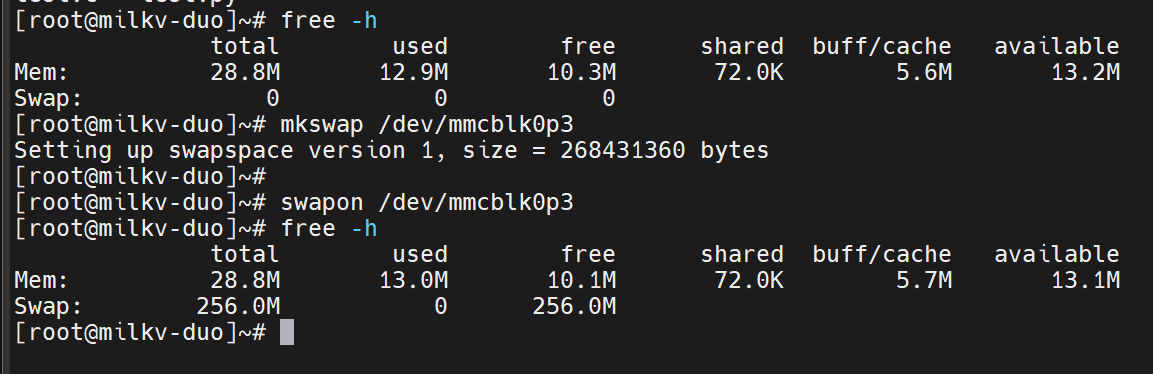
2】Enabling virtual memory in milkv-Duo:
Before using, make sure that milkv-Duo is using the system image Duo-V1.0.4 or above.
Enter the following commands in the terminal:
mkswap /dev/mmcblk0p3
swapon /dev/mmcblk0p3
Enter 'free -h' to check if virtual memory is enabled.