




- sales/support
Google Chat:---
- sales
+86-0755-88291180
- sales01
sales@spotpear.com
- sales02
dragon_manager@163.com
- support
tech-support@spotpear.com
- CEO-Complaints
zhoujie@spotpear.com
- Only Tech-Support
WhatsApp:13246739196
- Purchase/Shipping/Refund
WhatsApp:13424403025
Pi5-PCIe-Fish-Board-A User Guide
Step 1 Enabling PCIe】
By default the PCIe connector is not enabled. To enable it you should add the following option into /boot/firmware/config.txt and reboot:
# Enable the PCIe External connector.
dtparam=pciex1
A more memorable alias for pciex1 exists, so you can alternatively add dtparam=nvme to the /boot/firmware/config.txt file.
NOTE
Enumeration of PCIe devices behind a switch is not currently supported.
Step 2 PCIe Gen 3.0】
The connection is certified for Gen 2.0 speeds (5 GT/sec), but you can force it to Gen 3.0 (10 GT/sec) if you add the following lines to your /boot/firmware/config.txt.
# Enable the PCIe external connector
dtparam=pciex1
# Force Gen 3.0 speeds
dtparam=pciex1_gen=3
WARNING
The Raspberry Pi 5 is not certified for Gen 3.0 speeds, and connections to PCIe devices at these speeds may be unstable.
You should then reboot your Raspberry Pi for these settings to take effect.
Step 3 Booting from PCIe】
Once enabled, and after you reboot, an NVMe disk attached via the PCIe should be visible. However, your Raspberry Pi won’t try to boot off the NVMe drive. If you wish to enable boot support you will need to change the BOOT_ORDER in the bootloader configuration. Edit the EEPROM configuration by,
sudo rpi-eeprom-config --edit
and change the BOOT_ORDER line to be as below.
BOOT_ORDER=0xf416
after saving your changes, reboot your Raspberry Pi to update the EEPROM.
NOTE】
Your Raspberry Pi will not boot from an attached NVMe drive unless you have the external PCIe port enabledd, and there’s a NVMe drive with a valid boot partition attached to the PCIe bus.
Step 4 Control the on-board LED and Extra Power】
Note: This step is not necessary. The module can work normally without these connections
Connect as the following picture
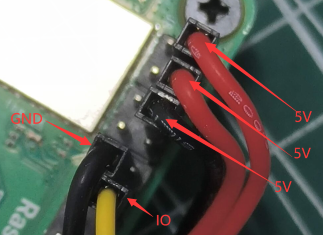
RUN LED-code
Note: This step is not necessary. The module can work normally without these connections
Connect as the following picture
RUN LED-code
TAG:
How to Use Product ROS2
Raspberry Pi 5 Camera User Guide
VGA to LVDS
Raspberry Pi AI Camera Official Original 12MP IMX500 Intelligent visual Sensor On-Board RP2040
X1301 Raspberry Pi 5 HDMI to CSI-2 Shield 1080P@60fps & Audio & Video Also For 4B/3B
Attitude Sensor
Solar Power Manager Module (D)
luckfox-pico-ultra-w-WIFI-Bluetooth
Industrial Modbus RTU RS485 8-ch 30A High Current Relay Module (E) With Digital Input
Raspberry Pi 5 Camera
ESP32 Mini TV
CAN FD
Industrial USB TO 8CH TTL Converter USB to UART Multi Protection Circuits Multi Systems
ESP32 2 inch Capacitive TouchScreen LCD Display ST7789 CST816D 240x320 For Arduino/Raspberry Pi/Pico
1.3inch LCD RP2040-PiZero Game ST7789 Raspberry Pi Pico LCD Display Screen
Serial UART Bus Servo ST3215 30KG.CM/19.5KG.CM Magnetic Encoder 360° High Precision And Large Torque
ESP32-S3 GC9A01A
Arduino Board Managers Tutorial User Guide
Raspberry Pi RP2040 Keyboard
Core3566004000
TAG:
Raspberry Pi 5 PCIe to M.2 NVME and PCM5122 I2S DAC HIFI Expansion Board Driver-Free
Raspberry Pi 8 inch DSI LCD (C) Display MIPI 1280×800 Capacitive TouchScreen
ESP32 Portable Pendant
JETSON NANO MINI
Industrial USB RS232 RS485 C UART FT232RNL 2m 3.3V 5V
Raspberry Pi 5 PCIe M.2 NVMe SSD Pi5 2280-2242 2230 X1002
DeepSeek AI Voice Chat Robot BOX ESP32-S3 Development Board 1.28 inch Round LCD 1.28inch TouchScreen N16R8
DeepSeek Chat Robot ESP32-S3 1.54 inch LCD N16R8 MUMA Development Board Display Screen Wifi Weather Station TimeClock
Raspberry Pi 3.5 inch e-Paper link (G) RYBW 384x184 For Arduino / Jetson Nano / STM32
UNO R4 Minima
Sipeed Lichee Tang Nano 4K FPGA W1NSR-LV4C GOAI Gowin
USB To CAN FD Bus Data Analyzer Bus Communication
ESP32-S3 1.28inch
AURORA AI Laser Radar Dual Eye Camera IMU Integrated Positioning Map
Sipeed SLogic USB Logic Analyzer 80M DAPLink CKLink Debugger Tool UART Module
Sipeed LonganPi Pi 3H ARM Linux H618 Cortex-A53
Jetson Xavier TX2 NX JETSON-IO-BASE-B
CAN Analyzer
Raspberry Pi Pico 2 RP2350/RP2040 W5100S-EVB-Pico W6300-EVB-Pico2 Ethernet Development Board ETH RJ45
High Performance AI at the Edge