- sales/support
Google Chat:---
- sales
+86-0755-88291180
- sales01
sales@spotpear.com
- sales02
dragon_manager@163.com
- support
tech-support@spotpear.com
- CEO-Complaints
zhoujie@spotpear.com
- Only Tech-Support
WhatsApp:13246739196
- Purchase/Shipping/Refund
WhatsApp:13424403025
Raspberry Pi X850-V3.1 User Guide
FAQ
1.What do you need to use Raspberry Pi X850 V3.1 / V3.0 mSATA Storage Board?
- A Raspberry Pi board(Pi 3B+, 3B, 2B, B+)
- The Raspberry Pi Power Supply
- A mSATA solid-state drive (SSD)
- A X850 V3.1 / V3.0 use matching case (optional)
2.What to do if the X850 device can not be recognized?
1.Please make sure your all the hardware installation is right, please refer to Installation Guide.
2.Try to use the blue usb cable to replace the usb connector to check if it is the usb connector problem.
3.Please remove your ssd card and check if the raspberry pi can find the device.
4.Please check your raspberry pi firmware, or use another raspberry pi to have a try. As there maybe some error happen during the download.
Sample:
MD5: 42E99CA1A035B36A283CFFAB0A8D5C23
SHA1: 1B3732124D939EDB3DCFAE30301C222B0DE82249
CRC32: A06F437E
Please check the above verify code (MD5 code or SHA1 code etc.) to check your image file if is complete. you can use the MD5 tools to get it.
3. Is it possible to switch off the LED indicator on X850 board?
No, the LED on X850 board is not support to switch off, and you can use some tape to cover the led if light affected in the dark.
4. Why the Raspberry Pi WIFI signal affected when use X850 board?
If you have happened to meet WiFi signal problem, it maybe you use the SAMSUNG SSD Which will have EMC (Electro Magnetic Compatibility) problem. We solved this problem on X850 V3.1 by placing the MSATA under the PCB board.
Overview
Features of the new version 3.1 V3.0
- About EMC (Electro Magnetic Compatibility) problem, We solved this problem on X850 V3.1 by placing the MSATA under the PCB board.
- When using the X850 as a bootable hard disk, the problem of 'reboot' command is solved;
- The X850 board can be mounted under the raspberry pi, retaining the use of GPIO;
- Same size as the Raspberry Pi motherboard
- Replaced the power supply mode (using the Micro usb power supply instead of the GPIO power supply, additional power may be required only when using a large capacity hard disk)
- All use patch processing technology, product quality is more reliable;
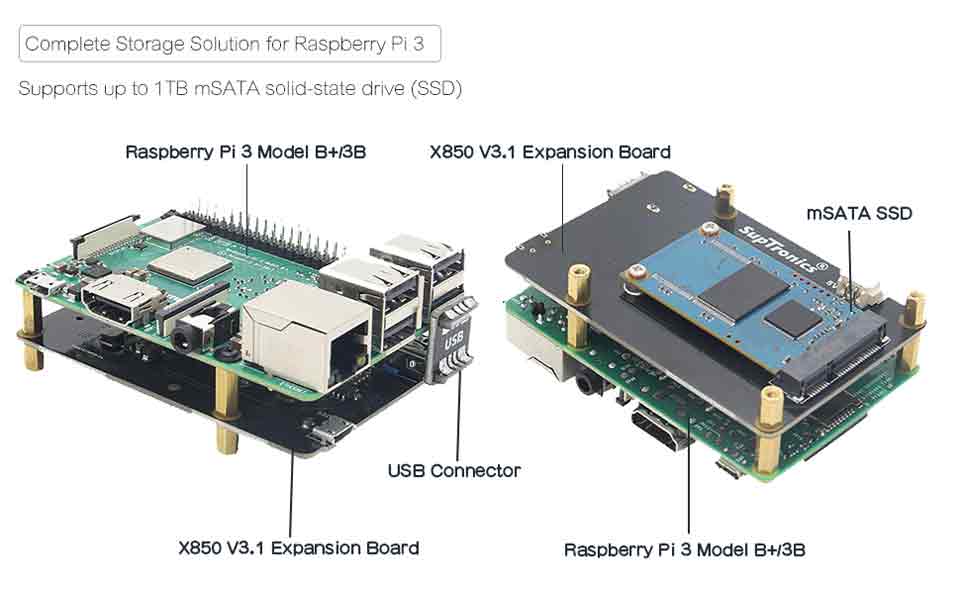
Power supply
Powered by the Raspberry Pi motherboard (only requires extra power when using a large capacity hard drive)
- The X850 expansion board provides a complete storage solution for raspberry pi, only mSATA interface SDD hard disk is suitable for X850 Board;
- For Use With: Raspberry Pi 3 Model B/ 2B / B+
- Support USB 3.0 w/ high quality USB 3.0 Cable ( Lenght- 80cm/2.62inch; Diameter- 5.96mm/0.19inch)
- Operating System: All Raspberry Pi operating systems
[NOTE]
- The Power switch is used to control the power of X870 / X860 / X850 V3.0 when the power switch is be connected to X735, or the power switch is useless. In other words, you must purchase the X735 to use this power switch.
- The cooling fan is useless if you purchase the X735, because X735 include cooling fan;
Feature
- Support super mute cooling fan, hundreds of round cooling holes on both side of the case, almost no weekeness for the bluetooth and WIFI signal;
- High quality metal material with surface galvanized process;
- Side Slot(Interface) for GPIO/FFC Cable
- Case Size(Installation): 9cm x 9cm x 6cm / 3.54inch x 3.54inch x 2.36inch;
Features
- Supports upto 1TB mSATA solid-state drive (SSD)
- Ideal storage solution for Raspberry Pi
- USB 3.1 Gen1( Support USB 3.0) to SATA 6Gb/s Bridge Controller
- USB 2.0 connectivity offers plug-and-play functionality on your Raspberry Pi
- Quick file transfer with high-speed USB 3.0 connectivity from a PC or a Mac
- Bus powered, No additional AC adapter required
- Ultra compact size
Specification
- Power supply: USB connection with raspberry pi.
- Output Ports: 1 x USB
Some Tips
How to boot from a USB Mass storage device on a raspberry pi 3
Please refer to X820#How to boot from a USB Mass storage device on a raspberry pi 3
Professional Review
We posted a professional review on the official Raspberry Pi forum, which details the features and use of the X850 mSATA Board. Please refer to: