




- sales/support
Google Chat:---
- sales
+86-0755-88291180
- sales01
sales@spotpear.com
- sales02
dragon_manager@163.com
- support
tech-support@spotpear.com
- CEO-Complaints
zhoujie@spotpear.com
- Only Tech-Support
WhatsApp:13246739196
- Purchase/Shipping/Refund
WhatsApp:13424403025
Raspberry Pi CM4-NVME-NAS-BOX User Guide
Overview
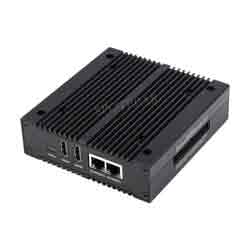
CM4-NVME-NAS-BOX is an all-in-one mini-computer, mainly designed but not limited to homes, small home offices, etc. Provides a simple and easy-to-use solution, no expert knowledge of networking and storage systems is required. On-board infrared, audio, and other modules.
Notes
- Do not unplug any device except the USB when it is charged.
- The Type C port can be used as a power supply or as a USB SLAVE interface to program images.
- In order to ensure the normal power supply of CM4, please do not connect other devices when using the Type C interface to program the image.
- When CM4 is in normal use, it needs to provide a 5V 2A or higher power supply for CM4. Otherwise, problems such as automatic shutdown and frequency reduction may occur.
- The module does not have any protection, please do not short-circuit the power supply.
- USB2.0 is closed by default, if you want to open it, you need to add dtoverlay=dwc2,dr_mode=host in config.txt.
Assembly Tutorial
User Guide
Click here to see how to install a NAS system
USB2.0
USB
TAG:
Arducam CSI-to-HDMI
Raspberry Pi 5 PCIe to 4 Port 2.5G Gigabit Ethernet Adapter RJ45 Ports
ESP32 C5 Development Board 1.47 inch LCD Display Screen ST7789 For WiFi6/LVGL/HMI Onborad SD-Port/RGB-LED
JETSON NANO B01
SpotPear
Arducam
GC9A01
SpotPear
Good low light performance
Jetson Orin Case
Multi Protection
Raspberry Pi Pico 2 RP2350 ETH CH9120 TCP/UDP Ethernet Network For Arduino
USB Camera 2MP GC2093 ‌WDR Backlight Compensation‌ Onboard microphone
ESP32 C6 Development Board with 1.32inch AMOLED Display QSPI Interface WiFi 6 Audio Acquisition Deepseek
MEGA2560 R3
Luckfox Pico Camera MIS5001 5MP wide-angle lenses For RV1106/Pro/MAX/Ultra (Not For RV1103 Pico)
1.28inch Round LCD
Milk V
Raspberry Pi 5 RTC Box
2.8inch Round LCD USB Monitor Computer Monitor Display Screen USB Type C Secondary Screen PC CPU GPU
TAG:
DeepSeek ESP32-S3 Voice Chat Robot 3.13 inch LCD
ESP32 S3 1.91 inch AMOLED Display Screen Arduino LVGL SD-Port QMI8658C 6-Axis Sensor
PiKVM-A3 Raspberry Pi 4 Operation and maintenance of Over IP Server
Raspberry Pi Triple LCD HAT
Raspberry Pi 5 Official Active Cooler
Raspberry Pi 5 Aluminium Case
Arduino UNO R4 Minima
Milk V Duo Module 01 Evaluation Board SG2000 512MB RISC-V Duo S
Raspberry Pi Power Relay Board
Pi 5 PCIe to M.2
Sipeed Lichee Nano LicheePi F1C100s LicheePi
MP2.5G POE RTL8125 Raspberry Pi 5 PCIe 2.5G HAT Pi5
SIM8202G M2 3G 4G 5G GNSS Sub-6G PCIe USB3.1 GPIO M.2 LTE-A NSA SA DFOTA VoLTE SIMCOM
Smart Car
ESP32 Thermal imaging
Raspberry Pi DA7212 For XiaoZhi AI Home Assistant Voice I2S Audio Card Expansion Board Dul-mic Free-Driver For PI5/PI4/Zero
Raspberry Pi A7670E LTE Cat-1 2G GSM GPRS LBS
PI5
PI5 8G
UGV Rover PT Kit AI OpenCV Robot Car MediaPipe For Jetson Orin