




- sales/support
Google Chat:---
- sales
+86-0755-88291180
- sales01
sales@spotpear.com
- sales02
dragon_manager@163.com
- support
tech-support@spotpear.com
- CEO-Complaints
zhoujie@spotpear.com
- Only Tech-Support
WhatsApp:13246739196
- Purchase/Shipping/Refund
WhatsApp:13424403025
- HOME
- >
- ARTICLES
- >
- Common Moudle
- >
- LCD
16x16 Chinese font modulo description
16x16 Chinese font modulo description
- The size settings are as shown below:
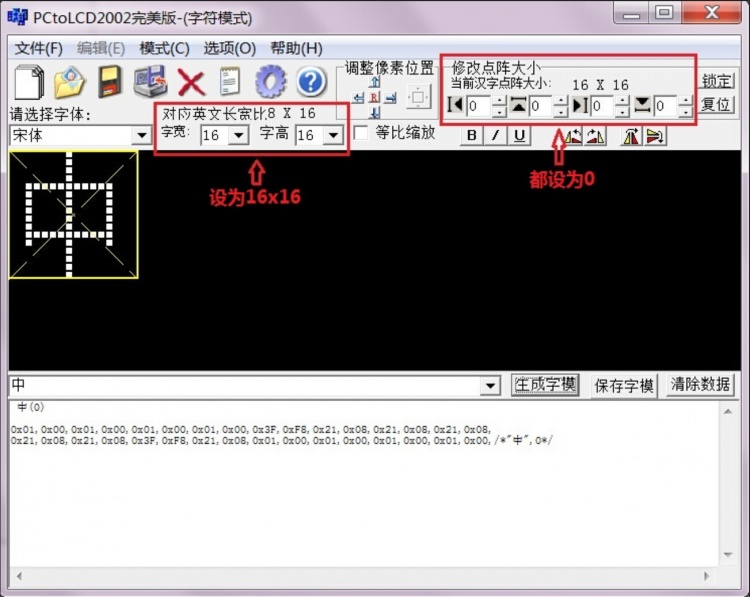
- After the modulo is successful, you need to define the following structure array to store the modulo data (the definition of structure is in the Chinese_and_English_display_modulo_settings):
const typFNT_GB16 tfont16[]=
{
  "中",0x01,0x00,0x01,0x00,0x01,0x00,0x01,0x00,0x3F,0xF8,0x21,0x08,0x21,0x08,0x21,0x08,
  0x21,0x08,0x21,0x08,0x3F,0xF8,0x21,0x08,0x01,0x00,0x01,0x00,0x01,0x00,0x01,0x00,
};
- The function is defined as follows:
void GUI_DrawFont16(u16 x, u16 y, u16 fc, u16 bc, u8 *s,u8 mode)
{
   u8 i,j;
   u16 k;
   u16 HZnum;
   u16 x0=x;
   HZnum=sizeof(tfont16)/sizeof(typFNT_GB16);	//Automatic statistics of the number of Chinese characters
   for (k=0;k<HZnum;k++)
   {
       if((tfont16[k].Index[0]==*(s))&&(tfont16[k].Index[1]==*(s+1)))
       {
           LCD_SetWindows(x,y,x+16-1,y+16-1);
	   for(i=0;i<16*2;i++)
           {
		for(j=0;j<8;j++)
		{
		     if(!mode) //Non-overlay mode: The font has a background color, which will overwrite the original display
		     {
			  if(tfont16[k].Msk[i]&(0x80>>j))
                          {
                               Lcd_WriteData_16Bit(fc);
                          }
                          else
                          {
                               Lcd_WriteData_16Bit(bc);
			  }
		     }
		     else //Overlay mode: the font does not have a background color, and is directly superimposed and displayed on the original display content
		     {
			  POINT_COLOR=fc;
			  if(tfont16[k].Msk[i]&(0x80>>j))
                          {
                               LCD_DrawPoint(x,y);//Draw a point
			  }
			  x++;
			  if((x-x0)==16)
			  {
			       x=x0;
			       y++;
			       break;
			  }
		     }
	        }
	    }
	 }
	 continue;  //Find the corresponding dot matrix font to exit immediately, to prevent the impact of multiple Chinese characters repeated modulo
    }
    LCD_SetWindows(0,0,lcddev.width-1,lcddev.height-1);//Restore window to full screen
}
TAG:
Development Board
360°
RoArm M2 4 DOF High Torque Serial Bus Servo ROS2 WIFI ESP NOW UART USB ST3235 QMI8658C For ESP32
Wireless AW CB375N 2.4G/5GHz Dual Band WiFi5 Wireless module RTL8822CE CG Bluetooth 5.0
ESP32 C3 Mini
ESP32 C6 Development Board 1.47 inch LCD Display Screen ST7789 For Arduino WiFi6/LVGL/HMI Onborad SD-Port/RGB-LED
Template: Pico-get-start
Zero LCD HAT (A) user guide
Raspberry Pi PICO
series bus servos
Raspberry Pi 10.1 inch QLED Quantum Dot Display 1280x720 Capacitive Touchscreen DDC/CI For Computer PC/Jetson/Game
Raspberry Pi 5
Raspberry Pi 24.5 inch Type C/HDMI 2K Display 24.5inch Screen 2560x1440 Computer PC Phone For Xbox/PS4/Switch
Raspberry Pi 5 8mp Camera
Raspberry Pi 5 Audio Jack
JSON Command Meaning
Raspberry Pi5 PCIe TO M.2 MINI Support Gen2 and Gen3 SSD Compatible 2230 2242
Industrial
Raspberry Pi OpenWrt Tutorial 1
Raspberry Pi 5 PCIe to SATA Expansion Board with EEPROM HAT+

TAG:
JETSON
Raspberry Pi 5 Pure-Copper Cooler
Raspberry Pi 5 PCIe Gigabit Ethernet RJ45 RTL8111H M.2_M_KEY 2230/2242/2260/2280 NVMe SSD
Raspberry Pi 5 Industrial Case
Raspberry Pi Pico 2 RP2350A 1.54inch TouchScreen 1.54 inch LCD Display Development Board 240×240
GPU Monitor Screen
LuckFox
All-metal compact UGV suspension Spring 7.5KG load DDSM115
ESP32-S3 Industrial RS485 Development Board with WLED Strip Driver and for XiaoZhi AI Voice Interaction
Serial UART Bus Servo ESP32 OLED Dispaly Monitor WiFi Bluetooth
ESP32 C3 MINI TV LVGL Astronaut Clock Watch Buzzer 1.69inch LCD TouchScreen Display ST7789 240x280
1.69inch LCD TouchScreen Display 240&times;280 ST7789 Arduino Raspberry Pi ESP32S3 Pico STM32
Raspberry Pi 5 27W
Sipeed Lichee Nano LicheePi F1C100s LicheePi
Options For 200 / 300 / 500mm
1.54 inch Passive NFC e-Paper ink (G) RYBW Display Screen No Need Battery Wireless Power & Data Transfer
Raspberry Pi 5 PCIe to M.2 SSD
RS485 to Relay
Raspberry Pi 8inch LCD HDMI Display TouchScreen 768x1024 Computer PC
RP2040 Camera