- sales/support
Google Chat:---
- sales
+86-0755-88291180
- sales01
sales@spotpear.com
- sales02
dragon_manager@163.com
- support
tech-support@spotpear.com
- CEO-Complaints
zhoujie@spotpear.com
- Only Tech-Support
WhatsApp:13246739196
- Purchase/Shipping/Refund
WhatsApp:13424403025
- HOME
- >
- ARTICLES
- >
- Jetson Series
- >
- Jetson Kits
NVIDIA JETSON-ORIN-NX-DEV-KIT User Guide
Introduction
Module
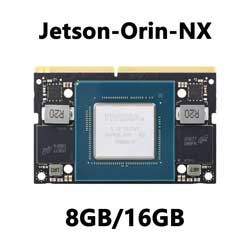
NVIDIA® Jetson Orin™ NX module delivers up to 100 TOPS and 5x the performance of the last generation for multiple concurrent AI inference pipelines, with high-speed interface support for multiple sensors, it is an ideal solution for a new age of robotics. Jetson Orin NX module delivers up to 100 TOPS of AI performance in a compact and small form factor, with power configurable between 10W and 25W, up to 3x the performance of Jetson AGX Xavier and 5x the performance of Jetson Xavier NX.
Basic Kit
Based on Jetson Orin NX Module, with JETSON-IO-BASE-B base board, provides rich peripheral interfaces such as M.2, HDMI, USB, etc., which is more convenient for users to realize the product performance.
This kit includes the Orin NX Module with 16GB memory, no built-in storage module, and provides up to 100 TOPS AI performance. Comes with a free 128 GB NVMe solid state drive, high-speed reading/writing, and meets the needs of large AI project development.
JETSON-ORIN-NX-16G-DEV-KIT-A
On the basis of the JETSON-ORIN-NX-16G-DEV-KIT, it is equipped with an 8MP (3280 x 2464) high-definition camera, suitable for AI intelligent applications such as face recognition, road sign recognition, and license plate recognition.
JETSON-ORIN-NX-16G-DEV-KIT-B
On basis of Kit A, it is equipped 13.3-inch Capacitive Touch Screen LCD (with case), 1920 × 1080 resolution, up to 10-point touch, built-in ferrite Hi-Fi speaker. It can display the images taken by the camera in real-time, to achieve more human-computer interaction in artificial intelligence operations.
User Guide
- Ubuntu 18.04 host or virtual machine is required to burn the system.
Preparation
- Jetson Orin NX board
- Ubuntu18.04 virtual machine (or computer host)
- Power adapter
- Jumper caps (or DuPont wires)
- USB cable (Micro USB interface for data transmission)
Hardware Configuration (Enter Recovery Mode)
- Short the FC REC and GND pins with jump caps or Dupont wires, positioned as shown above, located under the module.
- Connect the DC power supply to the round power port, wait a moment.
- Connect the micro USB port of the Jetson board to the Ubuntu host with a USB cable (note that it is a data cable).
System Installation
- Open a terminal on the Ubuntu virtual machine or host and create a new folder:
sudo mkdir sources_orin
cd sources_orin
- Download path:
https://developer.nvidia.com/downloads/jetson-linux-r3521-aarch64tbz2
https://developer.nvidia.com/downloads/linux-sample-root-filesystem-r3521aarch64tbz2
Move the resource package to the folder and unzip it (for the actual operation, please try to use the tab key to automatically complete the command).
udo mv ~/Downloads/Jetson-210_Linux_R32.7.2_aarch64.tbz2 ~/sources_orin/
sudo mv ~/Downloads/Tegra_Linux_Sample-Root-Filesystem-R32.7.2_aarch64.tbz2 ~/sources_orin/
- Unzip the resource:
sudo tar -xjf Jetson_Linux_R35.2.1_aarch64.tbz2
cd Linux_for_Tegra/rootfs/
sudo tar -xjf ../../Tegra_Linux_Sample-Root-Filesystem_R35.2.1_aarch64.tbz2
cd ../
sudo ./apply_binaries.sh  (If an error is reported, follow the prompts and re-enter the command)
- Program the system, follow the prompts if there is an error, and then run the following command
Jetson Orin NX + Xavier NX Devkit (NVMe):sudo ./tools/kernel_flash/l4t_initrd_flash.sh --external-device nvme0n1p1 \ -c tools/kernel_flash/flash_l4t_external.xml -p "-c bootloader/t186ref/cfg/flash_t234_qspi.xml" \ --showlogs --network usb0 p3509-a02+p3767-0000 internal
SDK Installation
Jetpack mainly includes system images, libraries, APIs, developer tools, examples, and some documentation.
The SDK includes TensorRT, cuDNN, CUDA, Multimedia API, Computer Vision, and Developer Tools.
- TensorRT : High-performance deep learning inference runs for image classification, segmentation, and object detection neural networks, which speeds up deep learning inference and reduces the runtime memory footprint of convolutional and deconvolutional neural networks.
- cuDNN: The CUDA deep neural network library provides high-performance primitives for deep learning frameworks, including support for convolution, activation functions, and tensor transforms.
- CUDA : The CUDA Toolkit provides a comprehensive development environment for C and C++ developers building GPU-accelerated applications. The toolkit includes a compiler for NVIDIA GPUs, math libraries, and tools for debugging and optimizing application performance.
- Multimedia API: The Jetson Multimedia API provides a low-level API for flexible application development.
- Computer Vision: VPI (Vision Programming Interface) is a software library that provides computer vision/image processing algorithms implemented on PVA1 (Programmable Vision Accelerator), GPUs, and CPUs, where OpenCV, the leading open source library for computer vision, image processing, and machine learning, now features GPU acceleration for real-time operation, where VisionWorks2 is a software development kit for computer vision (CV) and image processing.
- Developer Tools: Developer Tools CUDA Toolkit provides a comprehensive development environment for C and C++ developers building GPU-accelerated applications. The toolkit includes a compiler for NVIDIA GPUs, math libraries, and tools for debugging and optimizing application performance.
These are some of the features of the SDK.
Install SDK with Commands
sudo apt update
sudo apt install nvidia-jetpack