




- sales/support
Google Chat:---
- sales
+86-0755-88291180
- sales01
sales@spotpear.com
- sales02
dragon_manager@163.com
- support
tech-support@spotpear.com
- CEO-Complaints
zhoujie@spotpear.com
- Only Tech-Support
WhatsApp:13246739196
- Purchase/Shipping/Refund
WhatsApp:13424403025
Raspberry Pi 5 PCIE User Guide
Step 1 Enabling PCIe】
By default the PCIe connector is not enabled. To enable it you should add the following option into /boot/firmware/config.txt and reboot:
# Enable the PCIe External connector.
dtparam=pciex1
A more memorable alias for pciex1 exists, so you can alternatively add dtparam=nvme to the /boot/firmware/config.txt file.
NOTE
Enumeration of PCIe devices behind a switch is not currently supported.
Step 2 PCIe Gen 3.0】
The connection is certified for Gen 2.0 speeds (5 GT/sec), but you can force it to Gen 3.0 (10 GT/sec) if you add the following lines to your /boot/firmware/config.txt.
# Enable the PCIe external connector
dtparam=pciex1
# Force Gen 3.0 speeds
dtparam=pciex1_gen=3
WARNING
The Raspberry Pi 5 is not certified for Gen 3.0 speeds, and connections to PCIe devices at these speeds may be unstable.
You should then reboot your Raspberry Pi for these settings to take effect.
Step 3 Booting from PCIe】
Once enabled, and after you reboot, an NVMe disk attached via the PCIe should be visible. However, your Raspberry Pi won’t try to boot off the NVMe drive. If you wish to enable boot support you will need to change the BOOT_ORDER in the bootloader configuration. Edit the EEPROM configuration by,
sudo rpi-eeprom-config --edit
and change the BOOT_ORDER line to be as below.
BOOT_ORDER=0xf416
after saving your changes, reboot your Raspberry Pi to update the EEPROM.
NOTE】
Your Raspberry Pi will not boot from an attached NVMe drive unless you have the external PCIe port enabledd, and there’s a NVMe drive with a valid boot partition attached to the PCIe bus.
TAG:
ESP32-C6 AI Voice Chat Robot For Xiaozhi 1.8 inch AMOLED Development Board 1.8inch TouchScreen Deepseek
UART To WiFi
Raspberry Pi Robot Dog Wavego Pro 12 quadruped ESP32 ESP-NOW color recognition and self-balancing control
EG25-G Mini PCIe SIMCom Original 4G LTE Cat-4 Module Global Coverage GNSS PCI Express Mini Card
ESP32
VGA to TTL
Camera
Jetson Orin Nano/NX Super Developer IO Base Development Board Dual network RJ45 For Jetson Orin Nano/NX Module
Milk-V
Rounded LCD
ESP32 C3 MINI TV
ESP32-S3 AI Camera Development Board Dual Microphone with Display Port
Electronic EYE 0.71 inch Round Double LCD Display Dual Screen For Arduino Raspberry Pi ESP32 Pico STM32
ESP32-P4 Core Board 32MB PSRAM 16MB Flash
PC Secondary Screen
Raspberry Pi Camera 12MP Sony IMX708 autofocus HDR Module 3 Sensor Assembly
Sipeed NanoCluster Mini Cluster Board mini data center For Raspberry Pi CM45 / Computer /LM3H /M4N
Raspberry Pi 0.85inch LCD
CPU Monitor Display
H618
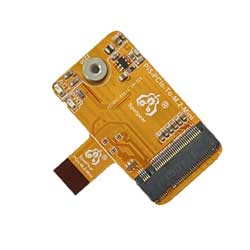
Raspberry Pi 5 PCIe to M.2 NVMe SSD Mini One-Body Board HAT Integrated-FPC & 90R Differential Matchi
TAG:
Raspberry Pi Secondary Screen
ESP32-S3 1.14inch LCD
Raspberry Pi 5 POE
NV3030B
SC3336-3MP-Camera-B
Raspberry Pi 1.54inch OLED
Raspberry Pi RP2040 Camera
Raspberry Pi 5 Industrial Case
USB Monitor Display
Raspberry Pi Pico 7inch DVI LCD
Raspber Pi 5 5V5A Power
ESP32-S3 AI Camera 1.28inch LCD Dual MIC Development Board Display 1.28 inch Voice Interruption Object Recognition 10-in-1 Multifunctional
ESP32 S3 Development Board 1.47 inch LCD Touch Screen 1.47inch Display 172×320 SD AXS5106L JD9853
Raspber Pi 5
Raspberry Pi 5
Raspberry Pi 5 NVMe
Arduino UNO R4
Modbus RTU 8-ch Relay Module (D)
Creative minimalist ornaments
Raspberry Pi Pico 2 RP2350 2.8 inch LCD Capacitive TouchScreen Development Board 240x320 Display QMI8658 6-Axis /PCM5101 Audio /SD /RTC /Battery Port