- sales/support
Google Chat:---
- sales
+86-0755-88291180
- sales01
sales@spotpear.com
- sales02
dragon_manager@163.com
- support
tech-support@spotpear.com
- CEO-Complaints
zhoujie@spotpear.com
- Only Tech-Support
WhatsApp:13246739196
- Purchase/Shipping/Refund
WhatsApp:13424403025
- HOME
- >
- ARTICLES
- >
- Milk-V
- >
- Milk-V Duo
Milk-V Duo 【Camera Tutorial】 CAM-GC2083
】Download
[] camera-Hardware schematics
[] duo_camera_test_v0.2.tar.gz
】Introduction
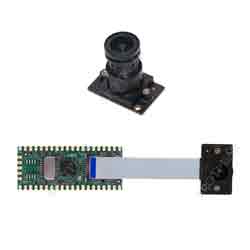
CAM-GC2083 is equipped with GLAXYCORE's GC2083 CMOS Image Sensor, providing up to 2MP resolution. It is compatible with the 16P MIPI CSI interface on the Milk-V Duo board.
】Parameter
Optical size: 1/3 inch
Pixel size: 2.7μm×2.7μm FSI
Active image size: 1920× 1080
Color Filter: RGB Bayer
Output formats: Raw Bayer 10bit/8bit
Power supply requirement: AVDD28:2.7~2.9V(Typ.2.8V)
DVDD:Generated by the intemalregulator (Typ.1.2V) IOVDD: 1.7~1.9V(Typ. 1.8V)
Power Consumption: 128mW@Full Size @30fps
Frame rate: 30fps@Full Size
PLL support Frame sync support (master/slave) Windowing support Mirror and Flip support
Analog Gain: 64X(Max)
Sensitivity: 3.24V/lux.s
Dynamic range: 74dB
MAX SNR: 37dB
】FPC Interface PIN Definition
| Pin NO. | Definition | Pin NO. | Definition |
| 1 | GND | 9 | MIPI0_CKP |
| 2 | MIPI0_DN0 | 10 | GND |
| 3 | MIPI0_DP0 | 11 | SENSOR_RSTN |
| 4 | GND | 12 | SENSOR_CLK |
| 5 | MIPI0_DN1 | 13 | I2C_SCL |
| 6 | MIPI0_DP1 | 14 | I2C_SDA |
| 7 | GND | 15 | / |
| 8 | MIPI0_CKN | 16 | 3V3 |
】Tutorial
This test is only used to verify if the camera is functioning properly. It runs a test program on Duo to stream video,
and then using VLC media player on a PC to receive the video stream.
1] Make sure you can SSH into the Duo device using USB networking (RNDIS).
The default firmware SSH username and password are root/milkv.
2] Download the test file package from the link provided
3] Transfer it to Duo using SCP or any other method.
scp duo_camera_test_v0.2.tar.gz root@192.168.42.1:/root/
4] Execute the program
Log in to the Duo terminal
ssh root@192.168.42.1
Unpack the test package
tar zxf duo_camera_test_v0.2.tar.gz -C /
Enter the test program directory
cd /mnt/data/install/
Execute the test program to start streaming
./CviIspTool.sh 64M
In normal circumstances, the terminal will display the following log at the end
VPSS init with src (1920, 1080) dst (1920, 1080).
CVI_VPSS_CreateGrp:0, s32Ret=0
rtsp://127.0.1.1:8554/stream0
prio:0
CVI_RTSP_SERVICE_CreateFromJsonFile[./cfg_64M.json]
[REMOTE] cvi_raw_dump_run,158: raw dump ready...
waiting for connect...
5] Play video by VLC media player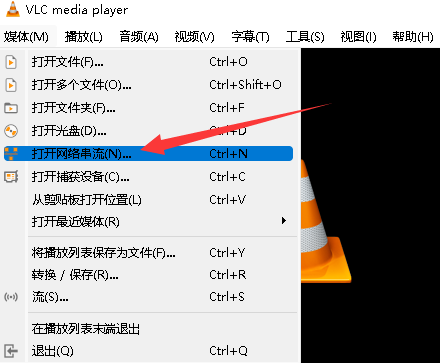
The link starting with 'rtsp:', replace the IP with the IP address of Duo, and that will be the streaming address to use in VLC media player.
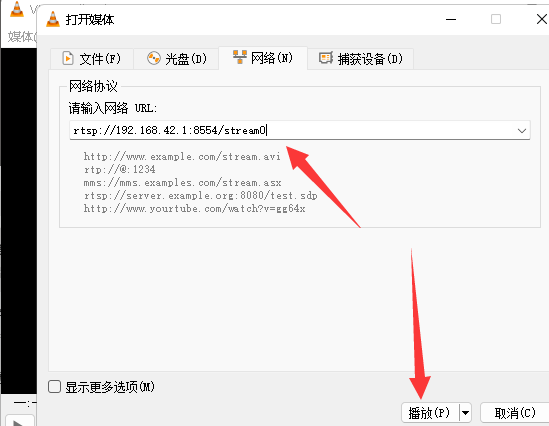
On your PC, open VLC media player. Go to the 'Media' menu and select 'Open Network Stream' In the 'Network' tab, enter the following URL in the 'Please enter a network URL' field.
rtsp://192.168.42.1:8554/stream0
Click 'Play' and you will be able to see the streaming video from the camera.