




- sales/support
Google Chat:---
- sales
+86-0755-88291180
- sales01
sales@spotpear.com
- sales02
dragon_manager@163.com
- support
tech-support@spotpear.com
- CEO-Complaints
zhoujie@spotpear.com
- Only Tech-Support
WhatsApp:13246739196
- Purchase/Shipping/Refund
WhatsApp:13424403025
- HOME
- >
- ARTICLES
- >
- Common Moudle
- >
- Camera
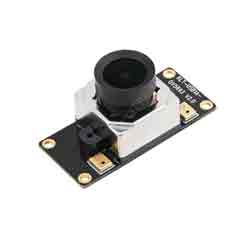
OV5693 5MP USB Camera (A) User Guide
Resource
Documents
Software
Specification
- Pixel: 5MP
- Sensor: OV5693
- DSP: Automatic white balance(AWB)\Automatic exposure(AEC)\Automatic gain control(AGC)
- Camera:
- CCD Size: 1/4inch
- Aperture (F): 2.1
- Focus length (EFL): 2.5mm
- Field of View (FOV): 135°
- Focus Type: Auto focus
- Interface: USB2.0
- Image:
- Format: MJPG, YUY2
- Static image resolution: 2592 × 1944
- Video recording (MJPG):
- 15 FPS 2592 × 1944
- 15 FPS 1920 × 1080
- 15 FPS 1280 × 720
- Video recording (YUY2):
- 3 FPS 2592 × 1944
- 5 FPS 1920 × 1080
- 10 FPS 1280 × 720
- 15 FPS 640 × 480
- Operating Voltage: 5V ± 5%
- Operating Temperature: 0°C ~ 50°C
- Len Size: 18.00 × 18.00 × 19.39 mm
- Dimensions: 18.00 × 36.00 mm
- OS Support: Windows, Linux, MacOS
Working with Windows PC
Test Software
Most of the Windows 10 PC has pre-install Camera software, you can use it to test the USB camera.
If your PC doesn't have Camera software, you can also download the AMCap test software from Resouce->Software and test.
Testing
- Use Camera Software of Windows
- Search "Camera" and open the software.
- Click the setting icon on the top left to configure the image/video.

- You can click the icons on the right to switch between Image Capture or Video Recording.
- AMCap Software
- Download and install the AMCap software.
- You can click the Options option, choose Video Capture Pin... or Still Capture Pin... to configure image/video.

Working with Raspberry Pi
Buster
- Open a terminal of Raspberry Pi (You can use the Ctrl+Alt+T shortcut):
- Edit the modules file:
sudo nano /etc/modules
- Add the following command in the document and save:
bcm2835-v4l2
- Ues command sudo raspi-config to open the configuration:
- Choose Interface Option -> Camera -> Yes to enable the camera and reboot.
Bullseye
You can directly test the USB camera on the Bullseye system.
Camera Test
- Open a Terminal of Pi and install luvcview tool with the following command:
- sudo apt-get install luvcview -y
- After installing, use the following command to test the USB camera.
- sudo luvcview -s 1920 x 1080


Working with Jetson Nano Developer Kit
- Open a terminal of Jetson Nano Developer Kit (You can use the Ctrl+Alt+T shortcut or open it by Mouse)
- Use the following command for previewing:
- nvgstcapture-1.0 --camsrc=0
- With the command, a preview window is opened

【Notice】You may need to use the camera by script/codes, in this case, you can refer to tools/libraries like Opencv yourself.
FAQ
Question:Why does the camera display abnormally when my hand touches it back?
Answer:
Do not touch the components on the back of the PCB with your hands, so as not to affect the electrical characteristics.
Question:Does the module get hot during use?
Answer:
It is normal that the module would generate a lot of heat during use.
Question:Why can't I control brightness, contrast, or other parameters?
Answer:
If you are using a Mac system and Opencv, some parameter settings are not available, so we recommend using a Linux system and the V4L2 driver.
TAG:
Raspberry Pi 12.3 inch LCD HDMI /Type C Display In-Cell Capacitive TouchScreen 1920x720 For Jetson Nano/mini Computer PC
IPS
GC9107
Raspberry Pi 5 PCIe to SATA Expansion Board with EEPROM HAT+
Image extraction User Guide
Raspberry Pi LCD display screen 1.3inch ST7789 with Game Button A
Milk-V Duo
7inch-DSI-LCD-H User Guide
ESP32 Portable Pendant
ADXL354BEZ
Wiki
Raspberry Pi Pico GNSS expansion board L76K GPS Beidou (BDS) GLONASS QZSS A-GNSS For RP2040/RP2350
1.83inch LCD TouchScreen Display 240×284 ST7789P For Arduino /Raspberry Pi /ESP32 /Pico /STM32
Camera
ESP32 S3 3.5 inch LCD Development Board 480x320 Display Capacitive TouchScreen Tablet /MP3 Video /Weather Clock LVGL For Arduino
Raspberry Pi 5 Audio Card
Milk V Duo
Install Espressif IDF Plugin Tutorial User Guide
GPU Monitor Display
xiaozhi AI Character Personality Configuration Tutorial
TAG:
Raspberry-Pi -GPIO-Audio-amplification-PWM-Sound-Card-Speaker-Buzzer
SpotPear
Pi5 Case
ESP32 C6 Development Board 1.28 inch LCD Touch Screen 240x240 CST816S SD card slot
USB Monitor Display
Raspberry Pi Zero V1.3
Raspberry Pi 11 inch HDMI LCD Captive TouchScreen Display 11inch 1920x1200 For Jetson Series/Computer PC
Raspberry Pi 5 PCIe
PC Monitor Screen
Raspberry Pi 5
Computer AI Deepseek Mechanical Voice Keyboard Xiaozhi LCD Screen keys Secondary Display
Raspberry Pi 5 Ethernet Moudle
1.91-Inch AMOLED
Raspberry Pi 5 MIPI Cable
Arduino ATmega32U4
WiFi Bluetooth
2.8inch Round LCD
Horizon Sunrise 5 D-Robotics RDK X5
E-Paper
1.47 inch LCD AXS5106L TouchScreen JD9853 Display 172x320 For Arduino/Raspberry Pi/Pico/ESP32