




- sales/support
Google Chat:---
- sales
+86-0755-88291180
- sales01
sales@spotpear.com
- sales02
dragon_manager@163.com
- support
tech-support@spotpear.com
- CEO-Complaints
zhoujie@spotpear.com
- Only Tech-Support
WhatsApp:13246739196
- Purchase/Shipping/Refund
WhatsApp:13424403025
- HOME
- >
- ARTICLES
- >
- Jetson Series
- >
- Jetson Acc
Jetson Nano Case (C) User Guide
Introduction
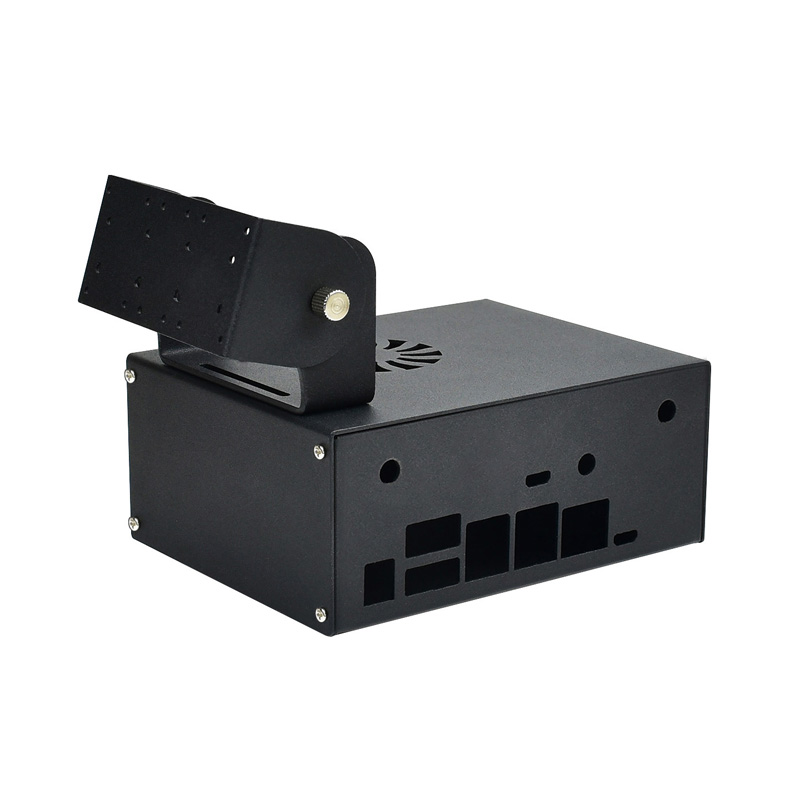
Jetson Nano Metal Case (C), Camera Holder, Internal Fan Design
Jetson Nano Case (C) Assembly
- Check the components before assembling.
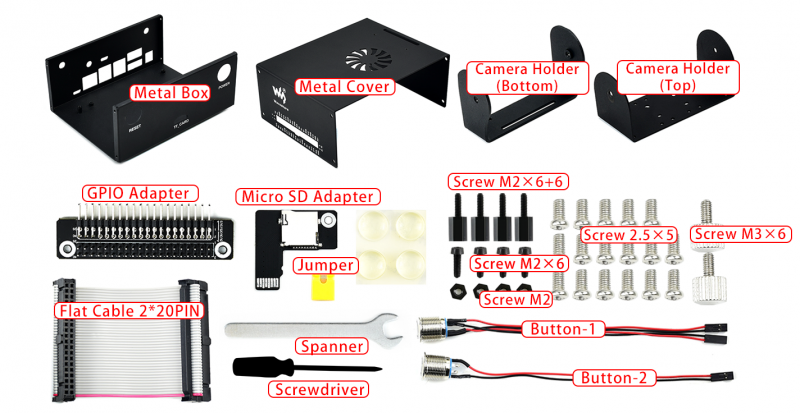
- Step 1
- Remove the Jetson nano, assemble the wireless module and replace it.
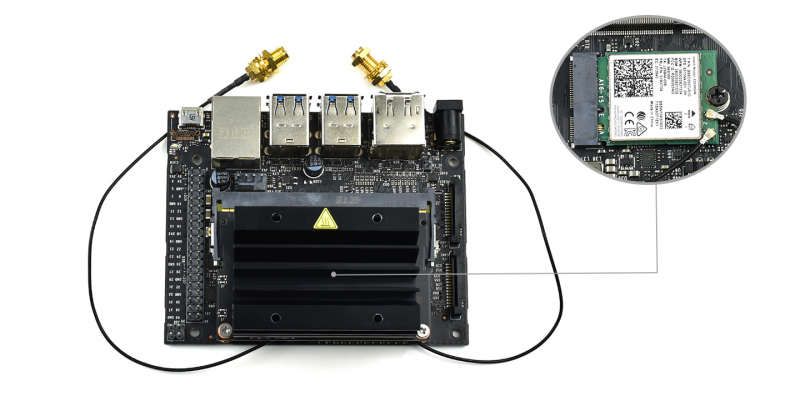
- Step 2
- Mount the buttons on the metal box, note that the button with four wires is the Power button and another which has two wires are the Reset button.
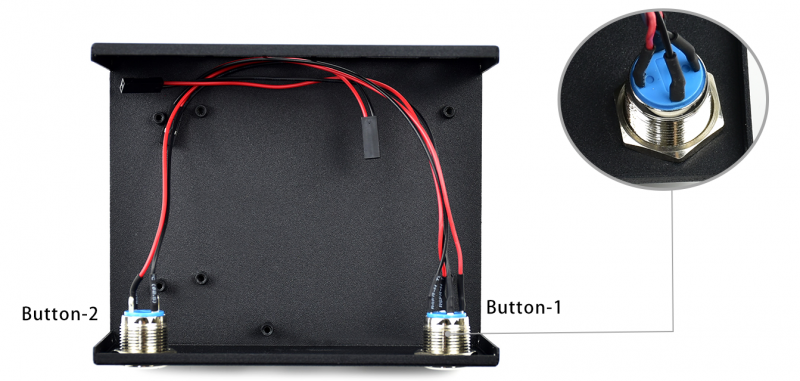
- Step 3
- Connect buttons to Jetson Nano, please refer to the diagram. Insert the micro SD adapter board to the Micro SD slot of Jetson nano. Press it to let it locked. Note that you should press the adapter to make sure that the adapter is pop-up, then remove it. You cannot directly pull it out, otherwise you will break the Micro SD slot.
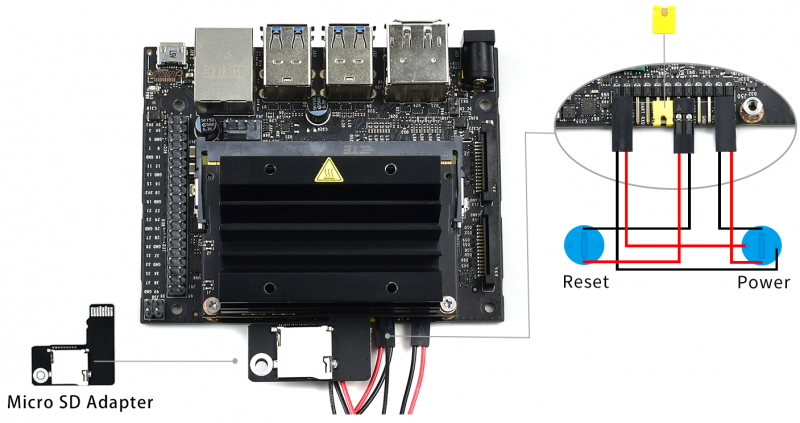
- Step 4
- Adjust the cables, mount the Jetson Nano developer Kit in the Metal box and fix it by screws. You should also fix the Micro SD adapter board by screw.
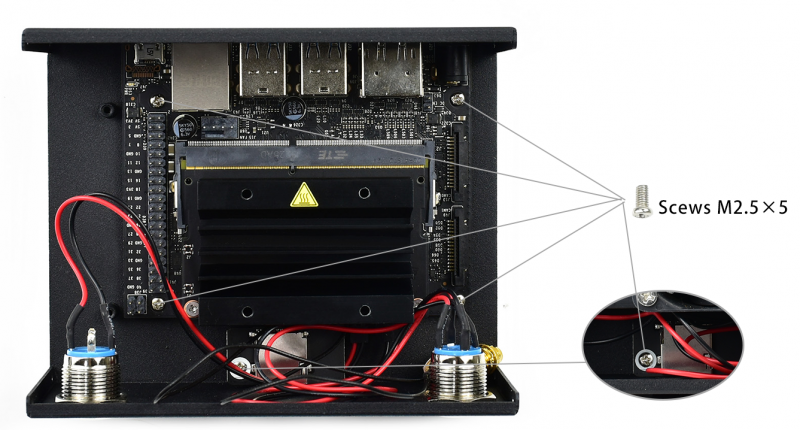
- Step 5
- Fix the Jetson Nano GPIO adapter board in metal box by skews.
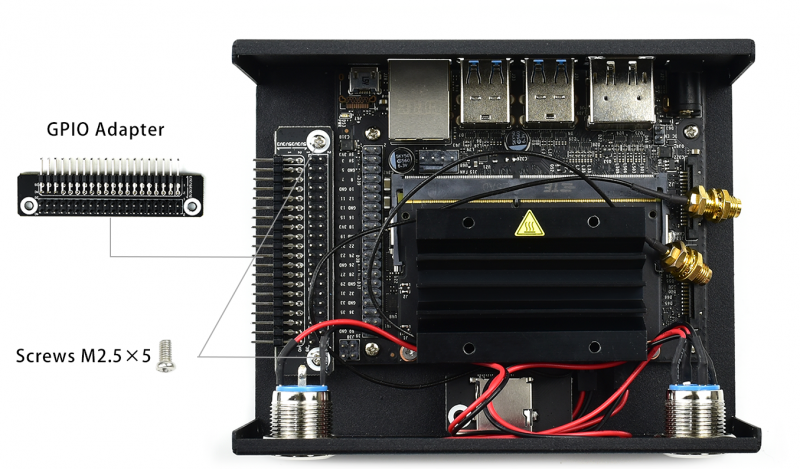
- Step 6
- Fix the antennas of the wireless module on the metal box. Assemble the cooling fan.
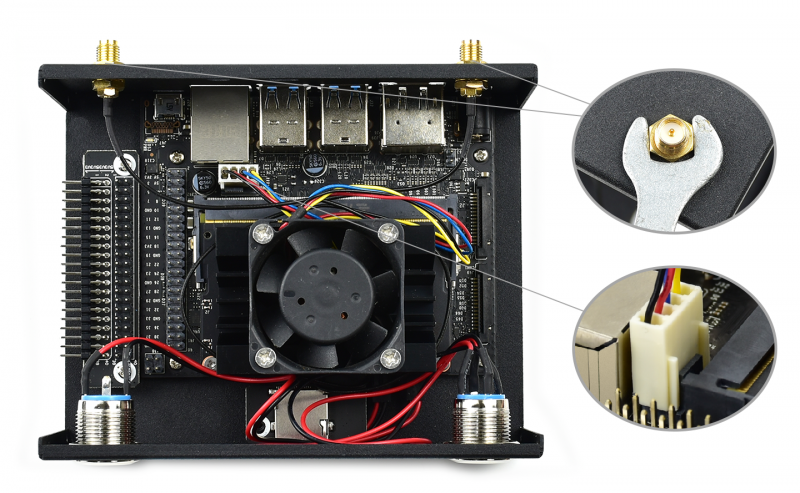
- Step 7
- Connect Jetson nano to the GPIO adapter by cable.
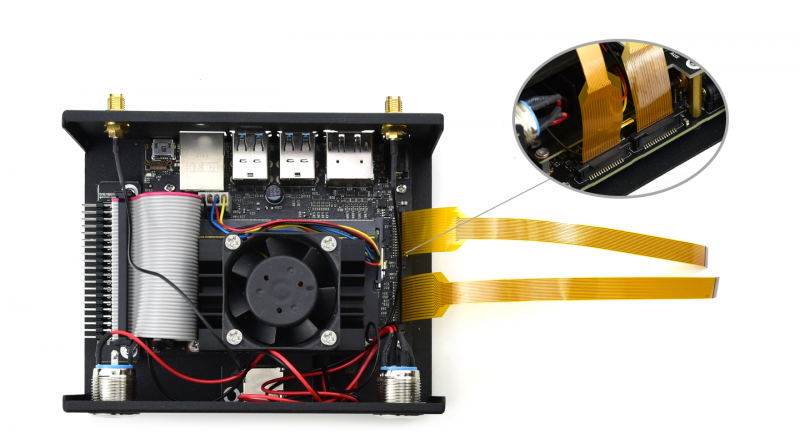
- Step 8
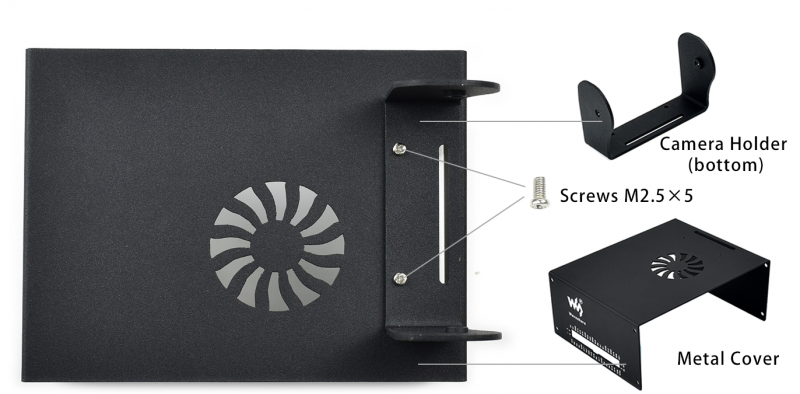
- Fix the camera holder-bottom on the metal cover.
- Step 9
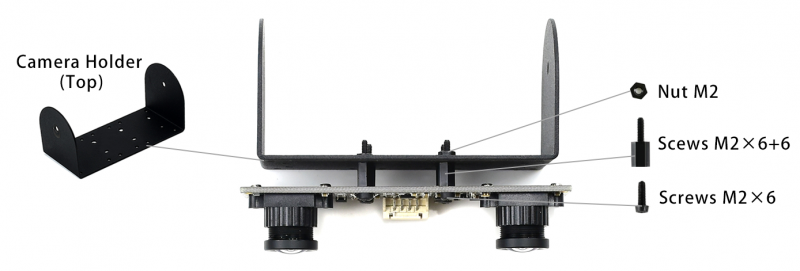
- Fix camera on camera holder-top by nylon screws.
- Step 10
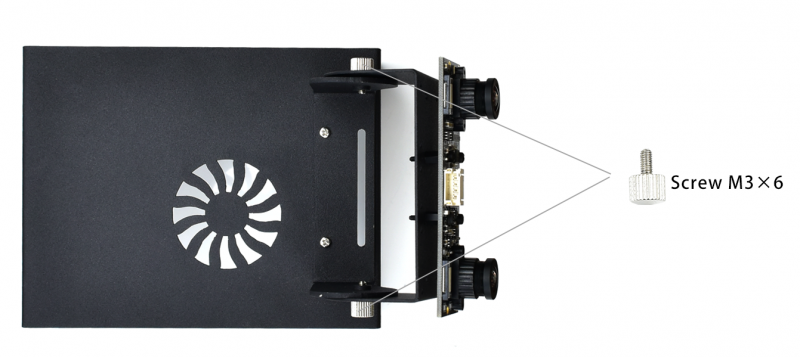
- Assemble camera holders by screws, adjust the angle and turn it tightly.
- Step 11
- Connect the cable cables to Jetson Nano (you can first remove it from cameras), If you have only one camera, just need to connect one cable.
- Step 12
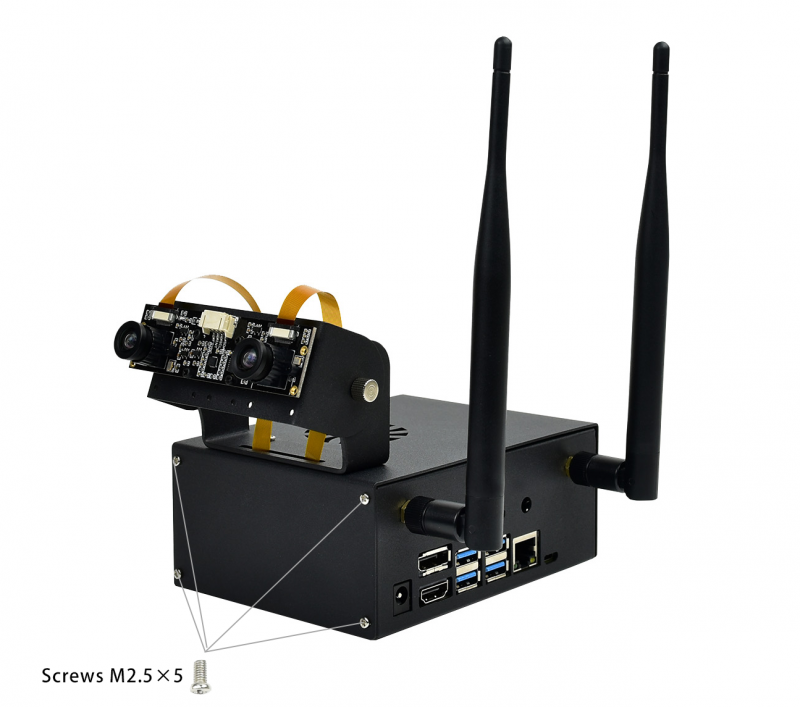
- Assemble the case, connect the Camera and antennas.
TAG:
Raspberry Pi 5inch Display 1024x600 HDMI Capacitive TouchScreen 5 inch LCD B Wide-Cover For Mini PC
ESP32-S3
AI Board
Raspberry Pi 18.5inch FHD LCD 1920x1080 Capacitive TouchScreen Display For Raspberry Pi/Jetson Nano/
Raspberry Pi 5 PCIe to 4-CH M.2 NVMe 4-Ports SSD Board HAT Pi5 Four-Times
Raspberry Pi 5 PCIe to SATA Expansion Board with EEPROM HAT+
Jetson Nano
ESP32-S3-Zero
LuckFox Pico
Raspberry Pi PICO LoRa
Raspberry Pi Touch Display 2 Official Original Capacitive TouchScreen 7 inch LCD TFT 720x1280
Raspberry Pi 3 LCD HAT
ESP-IDF download and installation
DeepSeek AI Voice Chat ESP32 Development Board 3.5 inch TouchScreen Display 320x480
RS485 Bus
ESP32 S3 AI 0.85inch Development Board 0.85 inch DeepSeek RGB surround light
ESP32 S3 R8 MP3 Board 2.8inch LCD TouchScreen Display Speaker/SD-Card/Battery/QMI8658-6-Axis-Sensor
Raspberry Pi 5 Silver-Shadow Case
Raspberry Pi 1.3inch IPS LCD display HAT
Core3566004000

TAG:
Raspberry Pi Buzzer
Raspberry Pi 5 Serial
XIAO-ESP32S3 Sense Camera S3R8 Arduino MicroPython SeeedStudio
Pi5
Dual-MCU-Board
ESP32 S3 touchscreen
ESP32-S3 3.49-inch Development Board DeepSeek AI Chat Box 3.49inch LCD Capacitive TouchScreen Display 172×640 N16R8
VisionFive2 Fan
RTL8852BE wireless network card Gigabit dual-band WiFi6 wireless module Standard Bluetooth 5.2
STM32 1.54inch OLED
Raspberry Pi 5
Flexible PVC Jacket
Raspberry Pi 5 PCIe M.2 NVMe SSD Pi5 mini
Pi5 Official Active Cooler
PoE Power Supply
SP3232EEN
SpeedyBee F405 V3 FC ESC Flight Controller DJI FPV Drone
RM500U CNV IoT EMBB 5G 4G 3G M.2 LTE-A/NSA SA GNSS DFOTA VoLTE Quectel
Raspberry Pi Camera 8MP IMX415 also For Luckfox-Omni3576 RK3576
Raspberry Pi PICO Keyboard