- sales/support
Google Chat: zj734465502@gmail.com
- sales
+86-0755-88291180
- sales01
sales@spotpear.com
- sales02
dragon_manager@163.com
- support
tech-support@spotpear.com
- CEO-Complaints
zhoujie@spotpear.com
- sales/support
WhatsApp:13246739196
SIMXXX Locates My Location on Gaode Map
Summary
SIM7600X 4G HAT is loved by people all over the world because of its perfect functions and stable performance while some people complain that the Internet access of SIM7600X 4G HAT and SIM7600 positioning and my location are quite different (Send the coordinate system obtained by SIM7600X to Baidu or Gaode map for checking). Here, let's learn about GNSS.
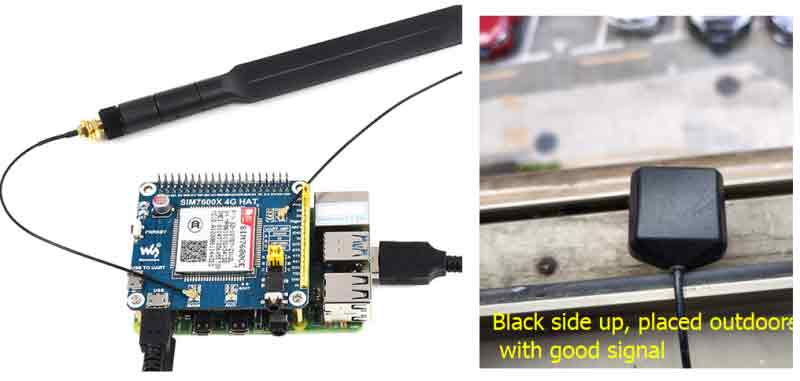
Hardware Connection Diagram
Software Preparation
Principle Analysis
The coordinate system used by SIM7600X is the WGS-84 coordinate system, and the coordinate system used by SIM820X is the Mars coordinate system (gcj_02); while the coordinate system used by our commonly used Baidu or Gaode map is the encrypted Baidu coordinate (bd09) and Mars Coordinate system (gcj_02). Therefore, if you directly put the WGS-84 coordinate system on Baidu or Gaode maps, there will be a big error (you can put it on Google Maps); in addition, the longitude and latitude obtained by SIMXXX are divided into units, and you need to convert the commonly used degree units first: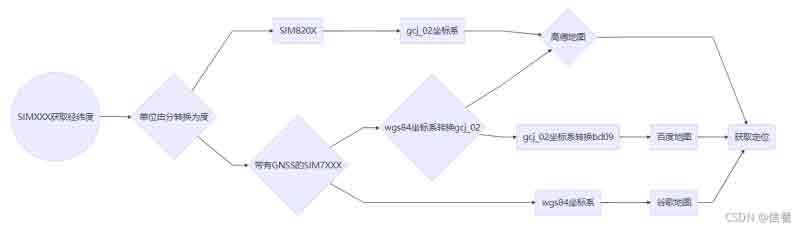
SIMXXX Obtains Location Information Such as Latitude and Longitude
Due to the instability of GPS indoor search, please put the module or antenna next to the balcony or window, or conduct the experiment directly outdoors. Plug in the GPS antenna and place the receiver tag face down in an open outdoor area. Under normal circumstances (outdoors, good weather, no large building blockage), it takes about 1 minute to receive a positioning signal after powering on; if the weather conditions are Not good, it may take longer to locate or even fail to locate.
- Send the following commands to open GPS:
AT+CGPS=1
- Used to command to obtain location information such as latitude and longitude:
AT+CGPSINFO
- Open NEMA to obtain detailed information.
sudo minicom -D /dev/ttyUSB1
- Unit conversion.
ddmm.mm--> dd.mm.ss: degree unchanged, fraction *100/60; such as 2232.448620--> 22.(32448620*100/60)= 22.54081033
- Coordinate system conversion key code.
def wgs84_to_gcj02(lng, lat):
     """
     WGS84 to GCJ02 (Mars coordinate system)
     :param lng: Longitude of WGS84 coordinate system
     :param lat: Latitude of WGS84 coordinate system
     :return:
     """
     dlat = _transformlat(lng - 105.0, lat - 35.0)
     dlng = _transformlng(lng - 105.0, lat - 35.0)
     radlat = lat / 180.0 * pi
     magic = math. sin(radlat)
     magic = 1 - ee * magic * magic
     sqrtmagic = math. sqrt(magic)
     dlat = (dlat * 180.0) / ((a * (1 - ee)) / (magic * sqrtmagic) * pi)
     dlng = (dlng * 180.0) / (a / sqrtmagic * math.cos(radlat) * pi)
     mglat = lat + dlat
     mglng = lng + dlng
     return [mglng, mglat]
def wgs84_to_bd09(lon, lat):
     lon, lat = wgs84_to_gcj02(lon, lat)
     return gcj02_to_bd09(lon, lat)

def _transformlng(lng, lat):
     ret = 300.0 + lng + 2.0 * lat + 0.1 * lng * lng + \
           0.1 * lng * lat + 0.1 * math. sqrt(math. fabs(lng))
     ret += (20.0 * math. sin(6.0 * lng * pi) + 20.0 *
             math. sin(2.0 * lng * pi)) * 2.0 / 3.0
     ret += (20.0 * math. sin(lng * pi) + 40.0 *
             math.sin(lng / 3.0 * pi)) * 2.0 / 3.0
     ret += (150.0 * math. sin(lng / 12.0 * pi) + 300.0 *
             math.sin(lng / 30.0 * pi)) * 2.0 / 3.0
     return return

def _transformlat(lng, lat):
     ret = -100.0 + 2.0 * lng + 3.0 * lat + 0.2 * lat * lat + \
           0.1 * lng * lat + 0.2 * math. sqrt(math. fabs(lng))
     ret += (20.0 * math. sin(6.0 * lng * pi) + 20.0 *
             math. sin(2.0 * lng * pi)) * 2.0 / 3.0
     ret += (20.0 * math. sin(lat * pi) + 40.0 *
             math.sin(lat / 3.0 * pi)) * 2.0 / 3.0
     ret += (160.0 * math. sin(lat / 12.0 * pi) + 320 *
             math.sin(lat * pi / 30.0)) * 2.0 / 3.0
     return return
Coordinates generated after running the sample program are copied to the Gaode map API.
sudo pip3 install pynmea2
sudo pip3 install pynmeagps
wget https://www.waveshare.com/w/upload/1/17/SIMXXX-GNSS.zip
sudo python3 SIM7600X-GNSS.py
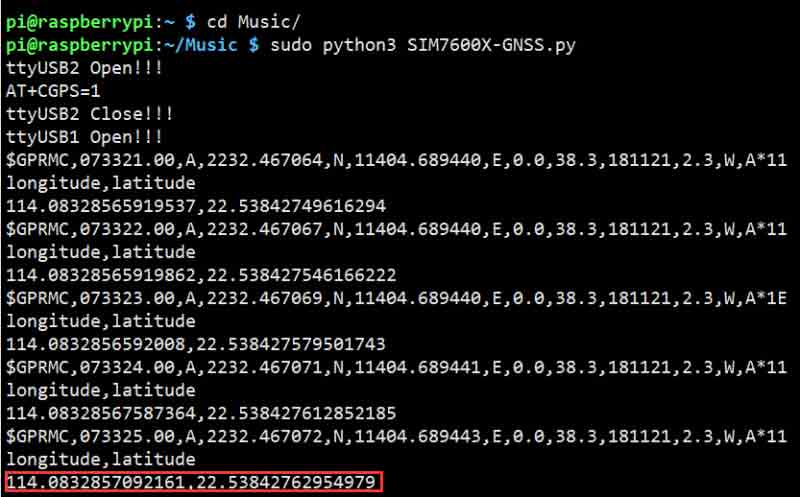
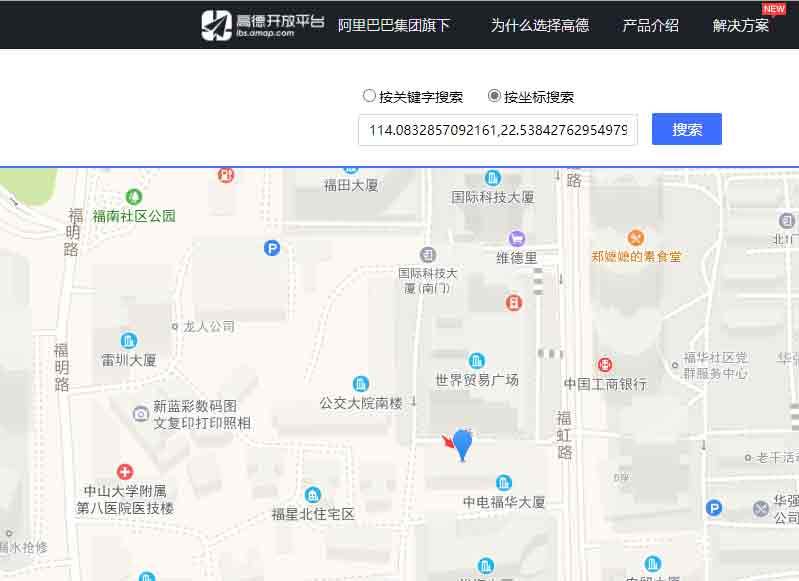
114.0832857092161,22.53842762954979
My Location
Positioning by the window on the south side of the World Trade Plaza, there is an error of 1-2 meters between the positioning and the editor's location; different test environments and conversion algorithms may have different errors.