




- sales/support
Google Chat:---
- sales
+86-0755-88291180
- sales01
sales@spotpear.com
- sales02
dragon_manager@163.com
- support
tech-support@spotpear.com
- CEO-Complaints
zhoujie@spotpear.com
- Only Tech-Support
WhatsApp:13246739196
- Purchase/Shipping/Refund
WhatsApp:13424403025
- HOME
- >
- ARTICLES
- >
- Common Moudle
- >
- LCD
Android SDK for NFC-Powered e-Paper
Import the .jar file
- Download the SDK
- Download the SDK and unzip it to get the .jar file
- NFC SDK
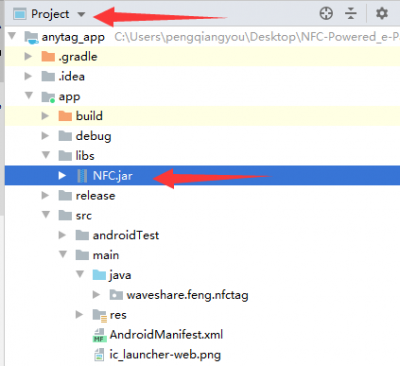
- Copy the Jar file to libs directory of your project.

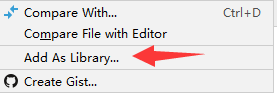
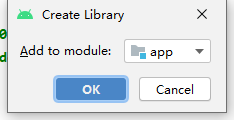
- Find the .jar file in your project, right-click it to add it as libraries.
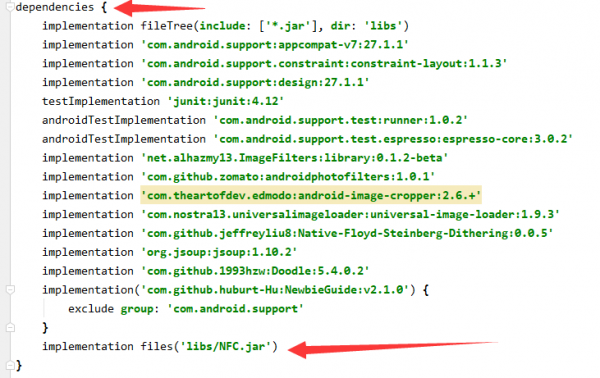
- After adding, the line will bee auto-added to build.gradle.:
Use guide
There are two functions provided, one is send function and any is status function.
Sent function
| Type | e-Paper |
|---|---|
| 1 | 2.13inch |
| 2 | 2.9inch |
| 3 | 4.2inch |
| 4 | 7.5inch |
| 5 | 7.5inch HD |
| 6 | 2.7inch |
| Type | e-Paper | width | height |
|---|---|---|---|
| 1 | 2.13inch | 250 | 122 |
| 2 | 2.9inch | 296 | 128 |
| 3 | 4.2inch | 400 | 300 |
| 4 | 7.5inch | 800 | 480 |
| 5 | 7.5inch HD | 880 | 528 |
| 6 | 2.7inch | 264 | 176 |
Status function
- int b()
- Return:
- 0-100:The current process of sending.
- -1:Failed
Examples
- 0-100:The current process of sending.
- -1:Failed
protected void onNewIntent(Intent intent) {//Recognized the NFC
    if (mWriteMode && NfcAdapter.ACTION_TAG_DISCOVERED.equals(intent.getAction())) {
        detectedTag = intent.getParcelableExtra(NfcAdapter.EXTRA_TAG);
        String[] tech = detectedTag.getTechList();//Get the descriptor
        if(tech[0].equals("android.nfc.tech.NfcA")) {//if the descriptor is correct
            Thread t = new Thread() {//Create an new thread
                @Override
                public void run() {
                    Boolean success = false;
                    NfcA tntag;//NFC tag

                    final a  a = new a();//Create a new instance.
                    a.a();//初始化发送函数

                    Thread thread = new Thread(new Runnable() {//Create thread
                        @Override
                        public void run() {
                            EPD_total_progress = 0;
                            while(EPD_total_progress != -1){
                                EPD_total_progress = a.b();//Read the process
                                if(EPD_total_progress == -1){
                                    break;
                                }
                                setStatusBody(getString(R.string.txing) + EPD_total_progress +"%");
                                if(EPD_total_progress == 100 ){
                                    break;
                                }
                                SystemClock.sleep(10);
                            }
                        }
                    });
                    thread.start();//start the thread
                    tntag = NfcA.get(detectedTag);//Get the tag instance.
                    try {
                        int whether_succeed = a.a(tntag,Size_Flag, bmp_send);//Send picture
                        if(whether_succeed == 1){
                            success = true;

                            runOnUiThread(new Runnable() {
                                @Override
                                public void run() {
                                    checkNFCpopwindow.dismiss(); //Tips

                                }
                            });
                            Success_Sound_Effects();

                        }else{
                            setStatusBody(getString(R.string.txfail));
                        }

                    } finally {
                        try {
                            if (success == false) {
                                setStatusBody(getString(R.string.txfail));
                                runOnUiThread(new Runnable() {
                                    @Override
                                    public void run() {
                                        checkNFCpopwindow.dismiss();
                                    }
                                });
                            }
                            tntag.close();
                        } catch (IOException e) {//handle exception error
                            e.printStackTrace();
                        }
                    }
                }
            };
            t.start();//Start thread
        }
    }
}
TAG:
Industrial USB TO RS485 2CH Converter FT2232HL Grade Isolated
Sipeed NanoKVM Cube KVM HDMI Remote OS Control Manager Install /Power Control /Remote Desktop Server UART
Modbus POE ETH Relay MQTT User Guide
101M-8001280-IPS-CT-K User Guide
ESP32-S3 LCD Mini tiny Development Board 0.85 inch Display 0.85inch Screen 128x128 SD-Port For Arduino
SpotPear
CSI Camera
Raspberry Pi LCD display screen 1.3inch ST7789 with Game Button A
Raspberry Pi 5 DSI User Guide
Jetson Nano Development
Raspberry Pi 5 PCIe to USB3 HUB Double 2.5G ETH RJ45 and M.2 NVMe SSD PI5 Expansion board HAT+
Serial UART Bus Servo CF35-12 TTL 35KG.CM Magnetic-Encoder High precision and Large torque
Arduino MLX90641
Raspberry Pi Triple LCD HAT
Arduino Thermal imaging
SpotPear
ESP32 C3 1.44inch LCD
Ranging Sensor
1.54 inch Passive NFC e-Paper BW Display E-ink Screen No Need Battery Wireless Powered & Data Transfer
XIAO RA4M1 Tiny SuperMini Board For Arduino Uno IDE For SeeedStudio R7FA4M1
TAG:
ESP32
ESP32 Display
Raspberry Pi Pico 1.14inch LCD
MP2.5G Raspberry Pi 5 PCIe 2.5G Ethernet Pi5 RTL8125
STLINK
Argon
Raspberry Pi 5 PCIe to Dual 2.5G Ethernet Adapter Board - Driver-Free
ESP32-S3 SIM7670G 4G LTE Cat-1 4G GNSS
Raspberry Pi 1.3inch LCD
Raspberry Pi LCD Capacitive TouchScreen Display HDMI 6.25inch 720x1560
Raspberry Pi Pico 2 RP2350 bit board Size & Port high Compatible With BBC Micro:bit
ESP32-S3 Display
Sipeed Lichee Tang Nano 4K FPGA W1NSR-LV4C GOAI Gowin
Raspberry Pi
Flipper Zero Air Mouse
Pi 5 PCIe to M.2
Raspberry Pi Pico Buzzer
ESP32 1.9 inch LCD Capacitive TouchScreen 1.9inch Display ST7789 170x320 for Arduino /Raspberry Pi /Pico
USB CAN Analyzer
MPS2242 POE Raspberry Pi 5 PCIe M.2 NVMe SSD Pi5 2242 2230