- sales/support
Google Chat:---
- sales
+86-0755-88291180
- sales01
sales@spotpear.com
- sales02
dragon_manager@163.com
- support
tech-support@spotpear.com
- CEO-Complaints
zhoujie@spotpear.com
- Only Tech-Support
WhatsApp:13246739196
- Purchase/Shipping/Refund
WhatsApp:13424403025
Raspberry Pi 1.54inch LCD-Retropie-Display configuration tutorial (device tree)
Official image version:
retropie-buster-4.7-xxxx.img
Board version:Raspberry Ri Zero/Zero 2/3B/4B/CM4
Firstly , you need update your retropie os . Make sure all software updated ok, No errors.
If have any errors, You need try again or check your internet.
Some errors will make display not work
sudo apt-get update
sudo apt-get upgrade -y
Download lcd154.dtbo to your pi
sudo cp lcd154.dtbo /boot/overlays/
sudo nano /boot/config.txt
Add the following code
dtparam=spi=on
dtoverlay=lcd154:rotate=270
hdmi_force_hotplug=1
max_usb_current=1
hdmi_group=2
hdmi_mode=1
hdmi_mode=87
hdmi_cvt 480 480 60 6 0 0 0
hdmi_drive=2
display_rotate=0
dtoverlay=dwc2,dr_mode=host
avoid_warnings=1
Download rpi-fbcp.zip to your pi
unzip rpi-fbcp.zip
cd rpi-fbcp/build/
sudo install fbcp /usr/local/bin/fbcp
sudo nano /etc/rc.local
Add the following code
sleep 7
fbcp &
like the following picture
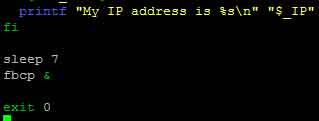
To reboot with using this command sudo reboot
Then the LCD will display ok