




- sales/support
Google Chat:---
- sales
+86-0755-88291180
- sales01
sales@spotpear.com
- sales02
dragon_manager@163.com
- support
tech-support@spotpear.com
- CEO-Complaints
zhoujie@spotpear.com
- Only Tech-Support
WhatsApp:13246739196
- Purchase/Shipping/Refund
WhatsApp:13424403025
Wrote Image for Compute Module Boards Lite version
If your CM4 board is Lite version without eMMC, Micro SD card is required, we recommend you to write image with SD card reader.
- Download the newest Raspberry Pi image from Raspberry Pi Website
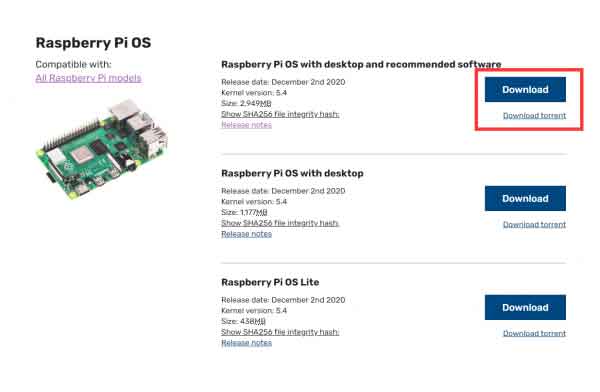
- Connect your Micro SD card to the host PC by the card reader.
- Format the Micro SD card (the portable disk) by SDFormatter.exe software
- Write the Raspberry Pi image to the Sd card by Win32DiskImager.exe software, Choose the image file and click "Write" to start. It may prompt to format the CM4 again after writing, just ignore it.
- After writing, a disk named BOOT is recognized, go into the disk and modify the config.txt file. Add the line to the file: dtoverlay=dwc2,dr_mode=host
- To finish, eject the BOOT disk from the host PC. Disconnect the USB cable and power adapter, disconnect the BOOT, and set the switch into OFF. restart the board and go ahead with the examples.
- If you do not have a card reader, you can insert the SD card to the carrier board and write it just like the eMMC version.
TAG:
H618
STM32 0.96inch RGB OLED
Raspberry Pi Pico 2 RP2350 GEEK 1.14 inch LCD 240x135 65K SWD/UART/I2C For OpenOCD/CMSIS-DAP
Xiaozhi-AI-video-tutorial-2
ESP32-C6 AI 1.54-inch e-Paper Ink Screen 1.54inch Display AIoT Development Board Deepseek
ESP32-S3
ESP32 S3 AI 1.54inch Development Board 1.54 inch TouchScreen Display DeepSeek
Magnetic Encoder Servo Motor 85KG.CM 12V/24V 360° RS485 High Precision And Large Torque
DeepSeek AI Voice Chat ESP32 S3 Development Board 1.83 inch TouchScreen Display 240x284
DAPLINK
Raspberry Pi Pico 2 RP2350B 7inch Capacitive TouchScreen 7 inch LCD Display Development Board 800×480
ESP32
RS485 to CAN
ESP32 S3 Development Board 4.3 inch LCD Capacitive Touch Screen 4.3inch Display 800×480 N16R8
ESP32-S3 ST7789
Raspberry Pi 5 Power
Raspberry Pi
ESP32-S3 DeepSeek AI Box Robot Development Board N16R8 Toy Doll Option 0.71 inch Electronic Eyes
1.38MP Global Shutter Camera ISG1321 For Luckfox Pico Zero
UART
TAG:
electronic Tag
Jetson Nano Case
ESP32-H2 Microcontroller Development Board
Raspberry Pi 5 Active Cooler
Raspberry Pi 5 Official Original SSD NVMe PCIe Gen3
Raspberry Pi 1.3inch LCD
Creative minimalist ornaments
Flipper Zero CC1101
ESP32 S3 2.1inch Round LCD
ESP32-S3 AI 1.54-inch e-Paper Ink Screen 1.54inch Display AIoT Development Board Deepseek
ESP32-S3 1.28inch Round LCD
Raspberry Pi 5 PCIe to M.2 NVMe SSD
USB IR Infrared Thermal Imaging Camera C 45°/88° 160x120 For Phone/PC High Temp Warning/Take Photo /Recording video
Jetson Orin NX
Raspberry Pi LCD display screen 1.3inch ST7789 with
ESP32-S3 AI Camera 3.5inch LCD Dual MIC Development Board MINI TV BOX Display 3.5 inch Voice Interruption Object Recognition 10-in-1 Multifunctional
RTL8723 WIFI SDIO Expansion Module Board For Luckfox Pico Mini B /Luckfox Pico Plus /Luckfox Pico Pro /Luckfox Pico Max
M12 High Resolution Lens 14MP 2.72mm For Raspberry Pi High Quality HQ Camera M12
Pi5 Case Tripod For Raspberry Pi Official Touch Display 2 / Waveshare 7inch DSI LCD (H) / Waveshare 7-DSI-TOUCH-A
Raspberry Pi Pico 2 RP2350 USB A Development Board